


How Do You Prepare Device Data for the EUDAMED UDI Module

Regulatory affairs teams across the EU are running out of runway. EUDAMED UDI compliance is mandatory from May 28, 2026, and the data preparation work required before a single device record goes live in the UDI/Devices module is far more demanding than most manufacturers anticipated. How do you prepare device data for the EUDAMED UDI module without batch rejections, labeling mismatches, or last-minute fixes that delay market access? This guide walks through the full workflow: prerequisites, data structuring, submission mechanics, common failure points, and the ongoing synchronization discipline that keeps your records audit-ready.
Table of Contents
Key Takeaways
Point | Details |
SRN comes first | Actor registration and your Single Registration Number must exist before any device data submission can begin. |
Hierarchical data structure matters | Each device family needs a correct Basic UDI-DI, variant-level UDI-DIs, and EMDN codes at the leaf product level. |
Single Source of Truth prevents batch failures | Mapping all required attributes to one authoritative internal record before upload reduces schema validation errors significantly. |
Label text must match 24 languages | Translated label data entered in EUDAMED must be word-for-word consistent with the physical label across all EU official languages. |
Compliance is a continuous process | EUDAMED data maintenance must be integrated into your QMS and change control procedures, not treated as a one-time submission. |
How to prepare device data for the EUDAMED UDI module: prerequisites
Before you touch the UDI/Devices module, two structural prerequisites must be in place. Skipping either of them makes submission impossible.
Actor registration and your SRN. Every manufacturer must complete actor registration in EUDAMED and obtain a Single Registration Number. Only manufacturers or contracted agents under the manufacturer’s SRN can legally submit device data. Authorized Representatives hold a verification role only. If you have engaged a third party to handle uploads, legal accountability for data accuracy still rests entirely with you as the manufacturer. This is not a shared liability arrangement.
Role clarity and issuing entity selection. Once your SRN is active, you must select a UDI Issuing Entity recognized by the European Commission. GS1 and HIBCC are the most widely used. Your choice determines the format of every UDI-DI and UDI-PI in your portfolio, so align this decision with your existing global labeling practice before proceeding.
With those foundations set, the data hierarchy becomes the critical next task. MDR/IVDR Annex VI defines three levels:
Basic UDI-DI. The grouping identifier for a device family sharing the same intended purpose, risk class, and design. This is the record that links to conformity assessment data.
UDI-DI. The device identifier for each specific variant. A change in color, size, sterility, or any other characteristic that triggers a new variant requires a new UDI-DI.
UDI-PI. The production identifier carrying lot, serial, manufacturing date, and expiry data. This lives on the physical label but is not registered in EUDAMED at the same level.
EMDN codes must be assigned at the most granular product level, the leaf node. Getting these codes wrong does not just cause a validation warning. It determines the classification logic EUDAMED applies to the record.
Data level | What it identifies | Where EMDN is required |
Basic UDI-DI | Device family grouping | No |
UDI-DI | Individual device variant | Yes, at leaf level |
UDI-PI | Production instance | No |
Structuring and preparing your device data step by step
Once your prerequisites are in order, the actual data preparation work begins. This is where most regulatory teams encounter their first real complexity: the gap between what they think they know about their product portfolio and what the EUDAMED data model actually requires.
Establish a Single Source of Truth. Before mapping any attribute to EUDAMED, create one authoritative internal record per device variant. Inadequate data governance and missing internal validation are the leading causes of batch upload failures. A spreadsheet or a product information management system both work, provided every field in EUDAMED can be traced back to a single approved source document.
Define your variant policy. Document exactly which attribute changes trigger a new UDI-DI assignment. This is not a judgment call made at upload time. It is a written policy, reviewed by regulatory and quality, that governs your entire portfolio. A sterile versus non-sterile version of the same device requires a separate UDI-DI. So does a device with a different reference number, even if the physical difference is minor.
Map all required attributes per the EUDAMED data model. Each UDI-DI record requires dozens of fields: device name, risk class, intended purpose, clinical size, packaging configurations, storage conditions, applicable standards, and more. Work through the EUDAMED data model field by field. Do not rely on memory or informal knowledge of what EUDAMED “probably needs.”
Prepare label text in all 24 EU official languages. This is the step most manufacturers underestimate. Every text field that appears on the physical label and is entered into EUDAMED must be consistent across all required languages. A device description that reads differently in the Polish EUDAMED record than on the Polish-language label is a compliance discrepancy. Reviewers and auditors will find it.
Select your submission method. Three submission options exist: manual entry through the EUDAMED web interface, XML bulk upload using the validated XSD schema, and machine-to-machine exchange via API. For portfolios of more than 20 to 30 devices, XML bulk upload or M2M is the only practical choice.
Validate internally before uploading. Run your XML file against the EUDAMED XSD schema in your own environment before submitting anything to the production system. A local validation pass does not guarantee acceptance, but it eliminates the most common structural errors before they reach the EUDAMED validation layer.
Pro Tip: Use the EUDAMED sandbox environment to test your first batch of 10 to 15 device records before touching production. Pilot testing reduces systemic errors and gives your team concrete feedback on field mapping before you commit the full portfolio.
Common failure modes during EUDAMED UDI data submission
Understanding where submissions break down is as useful as knowing how to prepare them. The following failures appear repeatedly in EUDAMED submissions across manufacturers of all sizes.
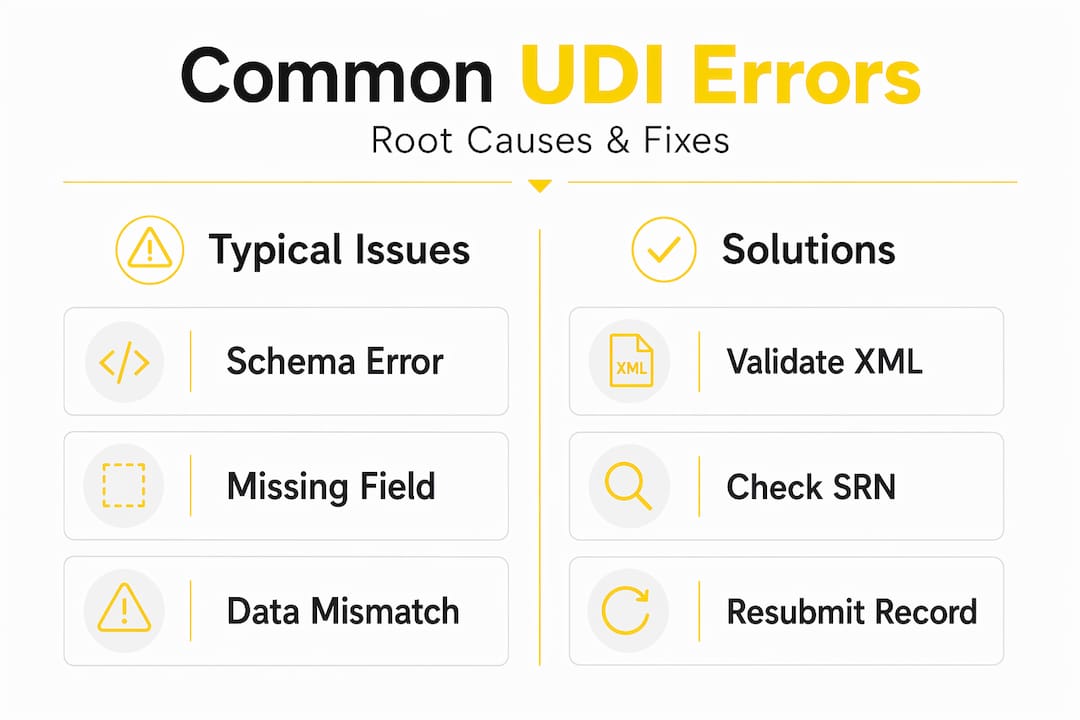
Failure mode | Root cause | Remediation |
XSD schema validation error | Incorrect data type, missing mandatory field, or wrong enumeration value in XML | Validate XML against current EUDAMED XSD v3.0.25 before upload; fix field mapping at source |
Basic UDI-DI grouping error | Variants with different risk classes or conformity routes grouped under one Basic UDI-DI | Review Annex VI grouping rules; split families where conformity assessment differs |
Conformity assessment mismatch | Annex X applied incorrectly to Class IIa or IIb devices; causes NB validation delay | Annex X applies only to Class III and certain IIb implantables in combination with Annex IX; correct the procedure reference |
EMDN code error | Code assigned at a parent node rather than the leaf level | Cross-reference the EMDN browser; assign the most specific applicable code |
Label text divergence | Translated field in EUDAMED does not match the approved physical label text | Establish translation review as part of EUDAMED data entry, not after |
Partial batch acceptance | Some records in a bulk upload accepted, others rejected | Monitor batch results actively; correct and resubmit rejected records promptly |
The conformity assessment mismatch deserves extra attention. Misapplying Annex X triggers a Notified Body confirmation request that can block the device registration indefinitely. This is not a warning state. The record stays in limbo until the correct procedure is entered and NB confirmation is received.
Pro Tip: When a bulk upload returns partial acceptance, do not resubmit the entire batch. Identify only the rejected records using the EUDAMED error report, correct those records at your Single Source of Truth, and resubmit just the corrected subset. Resubmitting accepted records creates duplicate entry risks.
Sustaining EUDAMED compliance after initial submission
Getting device records into EUDAMED is not the end of the process. EUDAMED registration is a continuous lifecycle process that must stay synchronized with your physical product, labeling, and QMS at all times.
Specific practices that sustain compliance:
Assign clear ownership. Designate a named individual responsible for EUDAMED data accuracy per product line. Without named ownership, updates fall through the gaps during product changes or personnel transitions.
Integrate EUDAMED updates into change control. Any design change, labeling change, or new variant must trigger a EUDAMED update as a formal step in your change control procedure, not as an afterthought. Link the EUDAMED record update to the change order closure condition in your QMS.
Schedule periodic data audits. At minimum twice per year, compare your EUDAMED records against your approved labeling files and internal device master records. Discrepancies caught internally are far less damaging than those found during a competent authority inspection.
Apply certified translation governance. Every multilingual label text field in EUDAMED must reflect the terminology from your approved translations. ISO 17100, ISO 13485, and ISO 27001 certified translation processes provide the auditability and terminology control needed to keep EUDAMED data consistent with physical labels across all 24 EU official languages.
Align QMS and EUDAMED workflows explicitly. Your document control, labeling approval, and EUDAMED update processes should share checkpoints, not run in parallel as separate workflows.
The risk of divergence grows with portfolio size. A manufacturer with 200 device variants across five product families has 200 opportunities per language for a label text mismatch to appear in the EUDAMED record.
My perspective: the translation gap no one talks about until an audit

I’ve reviewed EUDAMED preparation programs at manufacturers who had their UDI-DI assignments perfectly structured and their XSD files validating cleanly. They still had a compliance problem. The problem was in the label text fields populated for languages outside the manufacturer’s home country.
What I consistently see is that manufacturers treat translation as a content task rather than a regulatory data task. A freelance translator or a general-purpose NMT tool produces a Czech or Romanian version of the device description. That text goes into the EUDAMED record. Months later, when the approved Czech-language label is finalized through the proper documentation process, the terminology has shifted slightly. Now the EUDAMED record and the physical label say different things in Czech.
In my experience, this divergence is almost never caught before an audit. And when a competent authority inspector compares the EUDAMED entry to the physical label and finds inconsistency, the question is not “how did this happen.” The question is “what is your process for preventing this.”
The answer regulators want to hear involves certified translation workflows with terminology governance: Translation Memories that lock approved terms, term bases that enforce consistency, and a QA step aligned to ISO 17100 and MDR requirements. That is not a theoretical best practice. It is the process structure that creates an auditable evidence trail showing that your EUDAMED label data and your physical labels are the same document expressed in different languages, not two independently produced texts that happen to be similar.
My advice: treat every multilingual EUDAMED text field as a regulated document output, not a free-text entry. The legal requirements for certified IFU translations apply equally to what you enter into the database.
— Viestarts
How AD VERBUM supports EUDAMED multilingual data compliance
Keeping EUDAMED label text consistent with physical labeling across 24 EU official languages requires a translation process built for regulatory accountability, not general content production.
AD VERBUM holds ISO 17100, ISO 13485, and ISO 27001 certifications and operates a proprietary AI+HUMAN hybrid translation workflow designed specifically for regulated documentation. The process begins with ingesting your existing Translation Memories and Term Bases, so approved terminology carries over from your labeling files directly into EUDAMED text fields. AD VERBUM’s LLM-based LangOps System then generates target language output constrained by that terminology, followed by review from certified medical device subject-matter experts and QA aligned to ISO 17100, ISO 18587, and MDR requirements.
For regulatory teams managing multilingual device localization at scale, AD VERBUM’s EU-hosted infrastructure and audit-ready documentation outputs directly address the divergence risk between EUDAMED records and approved physical labels. Learn more about AD VERBUM’s translation approach and how it fits into your EUDAMED compliance workflow.
FAQ
What is required before submitting device data to EUDAMED?
Actor registration must be completed and a Single Registration Number obtained before any UDI/Devices module submission can begin. Only the manufacturer or a contracted agent under the manufacturer’s SRN may submit data.
What are the three levels of the EUDAMED UDI data structure?
The hierarchy consists of the Basic UDI-DI (device family grouping), the UDI-DI (individual variant identifier), and the UDI-PI (production identifier). EMDN codes are required at the UDI-DI leaf level.
Why do XML bulk uploads fail in EUDAMED?
Most bulk upload failures result from XSD schema validation errors, including incorrect data types, missing mandatory fields, or wrong enumeration values. Validating your XML file against the current EUDAMED XSD schema before upload prevents most of these failures.
How often should EUDAMED device records be audited?
A minimum of twice per year, EUDAMED records should be compared against approved labeling files and internal device master records. Any change control event affecting labeling or device characteristics should also trigger an immediate EUDAMED update.
Why must translated label text in EUDAMED match physical labels exactly?
A discrepancy between the text in a EUDAMED record and the approved physical label constitutes a compliance gap that competent authorities can identify during inspection. Certified translation processes with terminology governance, aligned to ISO 17100 and ISO 13485, provide the audit trail needed to demonstrate consistency across all EU official languages.
Sources
EUDAMED Factsheet Overview
Guidance on European Medical Device Nomenclature (EMDN)
Who Can Legally Upload Data to EUDAMED
EUDAMED UDI registration best practices and pitfalls
DNV: EUDAMED mandatory use
Avoiding Basic UDI-DI upload errors
EUDAMED Bulk Upload Validation Error Playbook
AD VERBUM Localization Services
Recommended
