


Audit Ready Remote Simultaneous Interpreting Setup for Planners
Get three things locked before anything else: a platform that meets network minimums, broadcast-quality audio at every mic, and paired interpreters who’ve rehearsed on your actual AV chain. Skip any one of these and the failure shows up live, in front of attendees. Schedule an end-to-end integration test with your chosen platform soon after booking interpreters, before you spend time on secondary features, following expert tips in How to Manage Your Remote Conferences: A Brief Guide.
Table of Contents
What Is Remote Simultaneous Interpreting, and When Does It Fit?
Remote simultaneous interpreting (RSI) routes a speaker’s audio to interpreters working off site, then returns the interpreted channel to attendees in real time, replacing the physical interpreter booth with a software bridge. Interpreters typically hear the source language on a 2 to 4 second delay, a gap that’s built into how RSI platforms process and relay audio. Attendees choose their language channel the way they’d choose a booth channel at an in-person conference: the floor feed stays available alongside every interpreted track, not replaced by it.
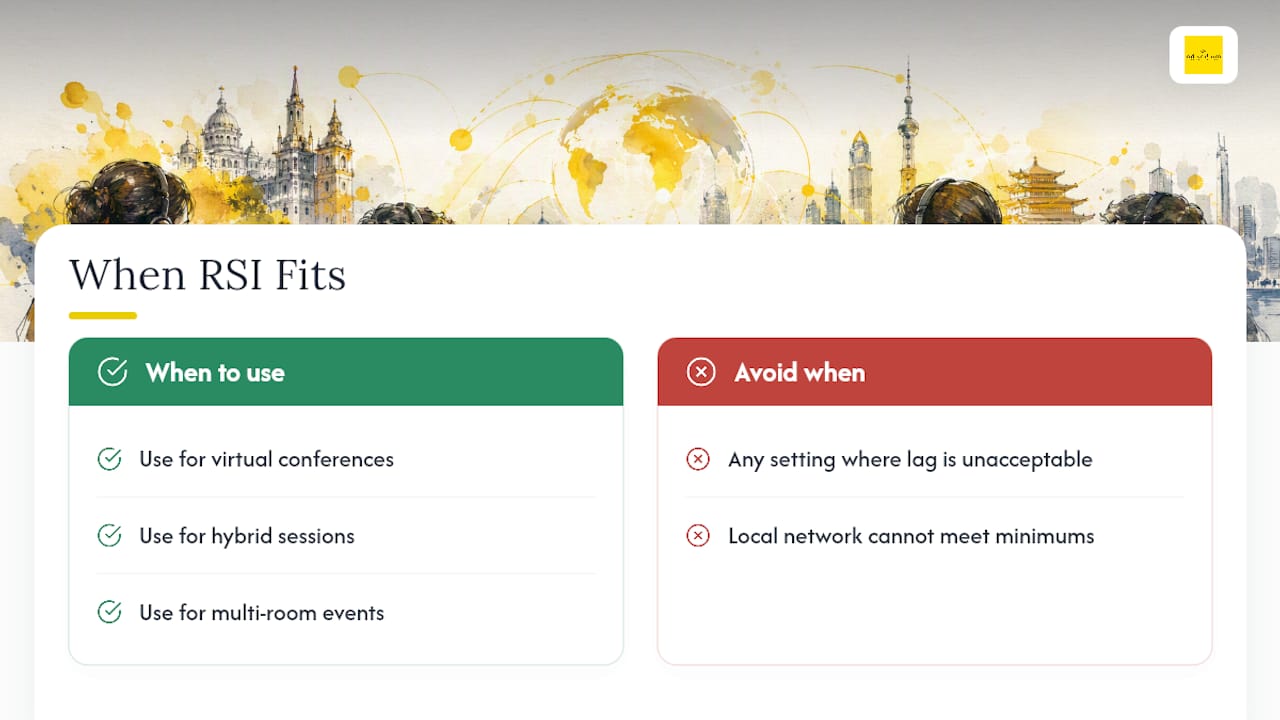
RSI fits virtual conferences, hybrid sessions with a mix of in-room and remote attendees, and multi-room events where flying in booth equipment for every room isn’t practical. It’s a weaker fit for settings where any lag is unacceptable, like live courtroom testimony, or where local network conditions can’t meet the minimums below.
What Hardware and Network Setup Does RSI Require?
Audio quality determines interpretation quality more than any other variable. Speakers need an external USB or XLR microphone, a pop filter, and their laptop mic disabled entirely. Built-in laptop mics pick up keyboard clatter, room echo, and HVAC hum, all of which interpreters have to work through while trying to render meaning in real time.
Interpreters need their own dedicated setup, regardless of whether they’re working from a professional hub studio or a home studio built to broadcast standards:
Closed-back headphones (open-back models leak audio into the mic feed)
A dedicated USB audio interface, not a built-in laptop input
A professional condenser or dynamic mic, positioned consistently
Basic acoustic treatment, foam panels or heavy curtains, to cut room reflection
A wired Ethernet connection, never Wi-Fi, for the session
On the venue side, capture options range from simple XLR feeds to SDI/NDI video integration to Dante/AES67 for larger AV networks. An RSI bridge or encoder captures that venue audio and video, pushes it to the interpretation hub over a protocol like SRT, and returns the interpreted channels to both the room’s PA system and remote attendees, which matters for hybrid events where duplicating the workflow for two audiences wastes budget.
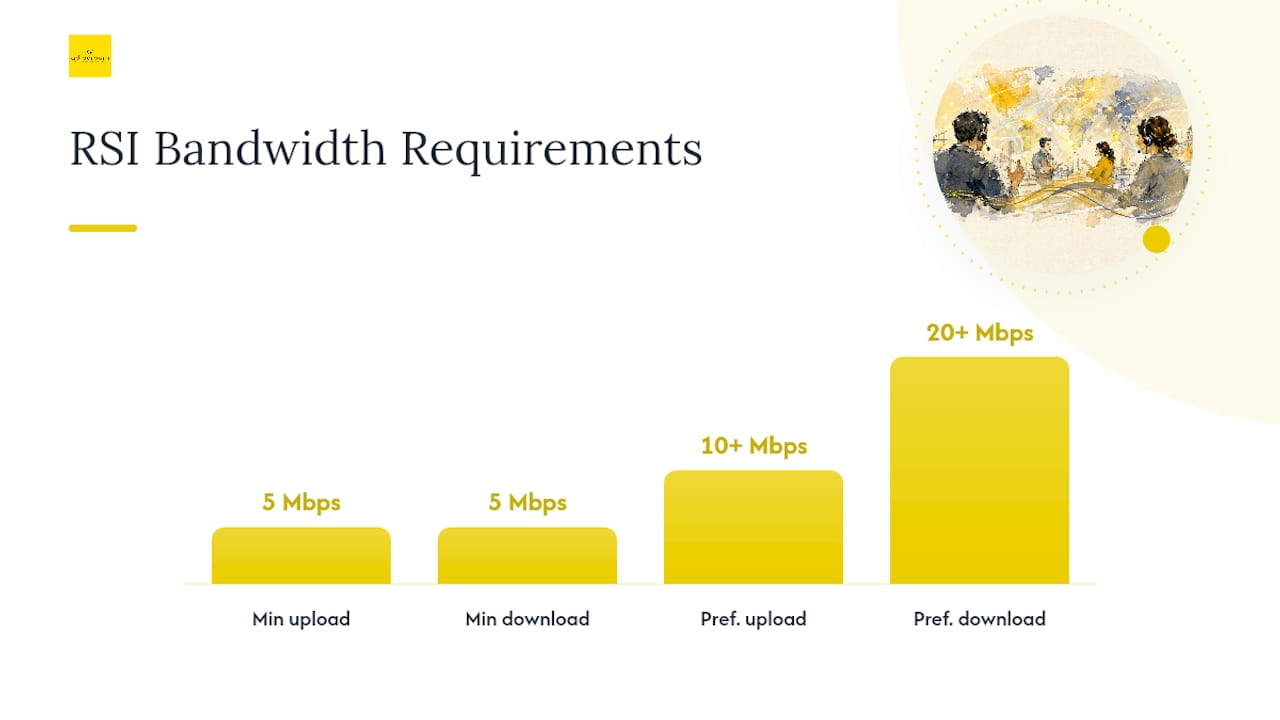
Network minimums: the recommended baseline is 5 Mbps minimum upload and download per critical connection point, with 10+ Mbps upload and 20+ Mbps download preferred for interpreters and encoders. Latency under 100 milliseconds is the target; jitter and packet loss both need to stay as close to zero as your ISP allows. Every interpreter and every AV operator should be hardwired, with a backup connection (a bonded 4G/5G failover, for example) tested before the event, not discovered as a gap during it.
Which RSI Platform Category Should You Choose?
Three platform categories cover most events, and the choice comes down to latency tolerance, scale, and integration effort:
Dedicated RSI platforms built specifically for interpretation, offering the most control over channel routing and interpreter tools
Conferencing add-ons layered onto tools your team already uses, faster to deploy but often more limited on interpreter controls
Cloud communications platforms with interpretation built into the base product, useful for teams that need channels available across many recurring meetings
Whichever category you pick, require these features before signing anything: low-latency audio routing, interpreter handoff controls that let a second interpreter take over without an audible gap, a live monitoring dashboard showing connection health per interpreter, and recording with access controls that match your event’s confidentiality needs. Dedicated platforms tend to win on reliability and interpreter tools; conferencing add-ons win on speed of setup. Weigh that trade-off against how technical your audience and content actually are.
How Should You Staff and Rotate Interpreters?
Interpreter fatigue is a documented risk in simultaneous interpretation, and the industry answer is staffing ratios, not heroics.
Book two interpreters per language pair for any session running longer than 30 minutes.
Rotate interpreters every 20 to 30 minutes to keep accuracy from degrading.
Add a standby interpreter for full-day programs or as insurance against a technical dropout.
Confirm each interpreter’s technical checklist before the event: wired connection, low-latency headset, and clarity on local mute rules so cross-talk doesn’t bleed into the feed.
Assign a producer to manage the virtual booth interface, including handoff buttons and timekeeping between rotating interpreters.
Deliver glossaries, speaker decks, and terminology briefings well ahead of the session, and give interpreters access to subject-matter experts for pre-event questions.
Interpreters with actual RSI experience, not just booth experience, handle the handoff mechanics and delay tolerance better than first-timers, and it’s worth confirming that history when you contract them.
What’s the Planning Timeline for a Remote Interpreting Setup?
Working backward from event day keeps technical failures from becoming last-minute surprises. A structured timeline, rather than an ad hoc scramble, is what separates events that run clean from events that don’t.
8 weeks out: Define your language pairs, select a platform category, contract interpreters, and start collecting reference materials.
4 weeks out: Send speaker prep kits, finish platform configuration, and schedule producer and AV team walkthroughs.
2 weeks out: Run a full technical rehearsal with interpreters on the actual AV chain you’ll use live, including a backup network test.
1 week out: Finish sound checks, send attendee channel-selection instructions, and confirm standby interpreter coverage.
Within that timeline, a few line items matter more than they look:
Speaker prep kits should specify exact microphone requirements and tell speakers to disable any competing noise suppression on their conferencing platform, since two audio processing layers stacked on top of each other create artifacts interpreters have to fight through.
The 2 week rehearsal should use final hardware, not placeholder equipment, because a mic swap after rehearsal invalidates the test.
Build the timeline into your event contract or SOW so interpreters and AV vendors are held to the same dates.
How Do You Handle Day-of Monitoring and Failures?
Interpreters should log in 60 minutes before doors open for pre-show audio checks and level setting, giving your team a full hour to catch problems before attendees notice anything.
During the session, someone needs to be watching, continuously, for:
Interpreter connection status and reconnection alerts
Real-time latency, since a creeping delay usually signals a network issue before it becomes an audible one
Audio clipping on speaker mics
The attendee feedback channel, which often flags problems faster than your dashboard does
When something breaks, the fix depends on what broke. An interpreter dropout means activating the standby immediately, not waiting to see if they reconnect. High jitter means routing to a backup encoder or connection. Speaker audio clipping usually means reducing input gain or swapping to a backup mic on the spot.
Pro Tip: Set up a secure backchannel, separate from the main event platform, exclusively for AV and interpreter communication. A dedicated “interpreter wrangler” watching that channel can resolve most issues in under a minute, before attendees ever notice a problem.
When Do You Need a Certified Language Service Provider?
Self-managed RSI works for internal meetings and low-stakes conferences where a dropped connection is an inconvenience, not a liability. It stops working once content touches regulated subject matter: clinical trial briefings, litigation-adjacent hearings, financial disclosures, or defense-sector meetings where a mistranslated term carries real consequences.
At that point, the decision criteria shift from “does it work” to “can we prove it worked correctly.” A compliant engagement should include:
Interpreters vetted for subject-matter expertise, not just language pairs
Documented terminology governance so technical and legal terms stay consistent across sessions
Secure platform integration with access controls suited to sensitive data
QA processes aligned to recognized standards, with an audit trail available after the event
AD VERBUM’s network of 3,500+ subject-matter expert linguists spans medical, engineering, and legal backgrounds, and its quality processes align with ISO 17100, ISO 18587, and ISO 27001, with certifications independently audited by Bureau Veritas. For regulated events where auditability matters as much as the interpretation itself, that combination of SME vetting and ISO-aligned QA is the actual decision point, not platform features alone.
An Editorial Take on Rehearsal Discipline
Buyers spend weeks comparing platform dashboards and almost no time budgeting for a real rehearsal on final hardware. That’s backwards. A mediocre platform with disciplined interpreters and a tested AV chain will outperform a feature-rich platform running on untested equipment, every time. Rehearsals and backup connections are what buy you uptime, not the vendor’s marketing page.
— Eric Brown
Get Your Remote Interpreting Setup Reviewed Before You Book It
AD VERBUM is the option to consider when your event involves regulated content, sensitive data, or a compliance team that will ask for proof after the fact. Where general AV vendors hand you a platform and leave staffing and terminology to you, AD VERBUM combines secure integration, certified subject-matter expert interpreters, and QA aligned to ISO 17100 and ISO 18587 in one engagement, running on the AI+HUMAN hybrid workflow across 150+ languages.
When you request a quote, include your language pairs, expected session lengths, preferred platform category, and any regulatory constraints (GDPR, HIPAA, or sector-specific requirements) up front. That lets AD VERBUM scope interpreter staffing and terminology governance correctly the first time, instead of revising the plan two weeks before the event. Visit AD VERBUM’s services page to start a quote request for your next multilingual session.
Sources
FAQ
What’s the minimum bandwidth for remote simultaneous interpreting?
The recommended baseline is 5 Mbps upload and download minimum, with 10+ Mbps upload and 20+ Mbps download preferred for interpreters and encoders, plus latency under 100 milliseconds.
How many interpreters do you need per language?
Book two interpreters per language pair for sessions longer than 30 minutes, rotating every 20 to 30 minutes, with a standby interpreter for full-day events.
Does RSI integrate with Zoom or Microsoft Teams?
Yes, through conferencing add-ons that layer interpretation channels onto platforms you already use, though dedicated RSI platforms generally offer more interpreter control and lower latency for complex events.
What happens if an interpreter’s connection drops mid-session?
The producer activates the standby interpreter immediately rather than waiting for reconnection, which is why a standby interpreter and a tested backup network connection are standard requirements, not optional extras.
What does AD VERBUM charge for interpretation services?
Pricing for AD VERBUM’s interpretation services is custom and quote based, scoped to your languages, session length, and platform requirements.
Recommended