


How to Localize Number Formats in Regulated Content

Number formatting localization converts a number’s stored value into the separators, grouping, signs, numerals and currency conventions of a target locale, without changing the value. Teams keep numbers locale-independent in data, format them with locale-aware libraries at display, and carry a currency code with every amount. Regulated documents add human review and an audit trail.
Table of Contents
What does number formatting localization cover?
Number formatting localization covers every visible property of a numeric value that depends on locale. The value stays the same. Its written form changes.
The Unicode CLDR standard (UTS #35, Part 3, CLDR version 49) defines number symbols such as the decimal separator, the group separator, the minus sign and the plus sign. It also defines optional currency-specific decimal and group symbols that can override the regular ones in currency formatting.
The properties that vary are:
Decimal separator: a period or a comma.
Group separator: a comma, a period, a space or another character.
Grouping size: three digits, two digits after the first group, or four digits.
Sign display: minus sign, plus sign, or parentheses for negative accounting values.
Numeral system: Western digits, Arabic-Indic digits, Devanagari, Han decimal numerals or algorithmic systems.
Currency symbol position and spacing.
Currency precision and rounding.
Percent and approximate-number patterns.
Dates, units and phone numbers are related topics. They are outside the scope of this article, which addresses numeric values and currency amounts.
How do US number formats differ from other locales?
The W3C states that the US and UK use a period as the decimal separator, as in 1,234.56. Much of Europe and South America use a comma. Grouping separators can be commas, periods or spaces. Three-digit grouping is common but not universal. India uses two-digit grouping beyond the hundreds, and some specialized formats use four-digit grouping.
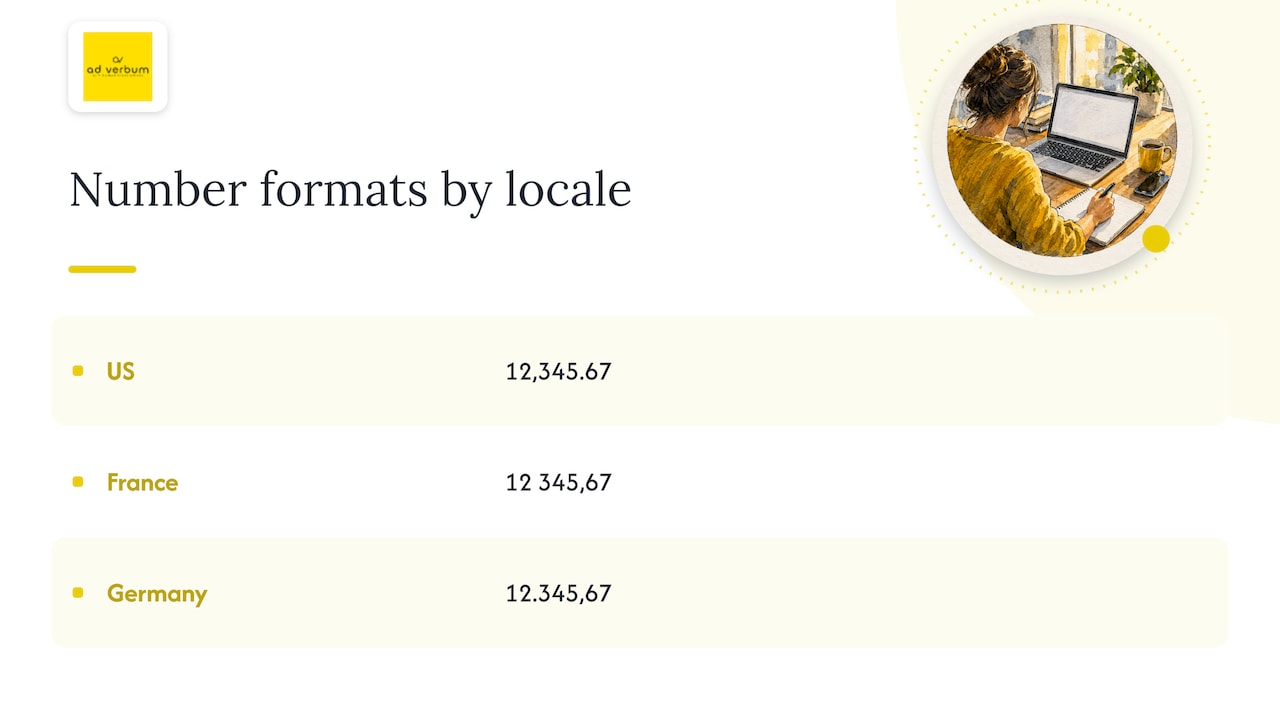
The ICU documentation gives a compact example. The value 12345.67 is written 12,345.67 in the US, 12 345,67 in France and 12.345,67 in Germany. The same string “1,005” therefore reads as one thousand and five in a US document and as a value slightly above one in a German one.
CLDR also defines primary and secondary grouping sizes. A South Asian pattern produces 12,34,56,789 from a single value. A reader who expects three-digit groups can misread this on first pass.
Numeral systems add a second layer. CLDR separates numeric systems, which use a predefined digit set such as Western, Thai or Devanagari digits, from algorithmic systems such as Chinese, Hebrew or Roman numerals. Algorithmic systems are formatted with rule-based number formatting (RBNF) syntax. MDN documents locale-driven output for 123456.789, including German separators, Arabic digits, Indian grouping and Han decimal numerals.
How does currency localization change symbols, spacing and precision?
Currency formatting follows the locale for layout and the currency for precision. These are separate controls.
Per CLDR, the position of the currency symbol follows the placeholder in the pattern. A variant can add a non-breaking space when the symbol is a letter. In the en_US locale, a negative amount may use the standard form (-$3.27) or the accounting form (($3.27)). Both are valid. A style guide must choose one. See the CLDR number and currency pattern guidance, which states that pattern symbols are placeholders replaced by locale-specific symbols and that spacing and position may change where appropriate.
Precision is set by currency data, not by locale. CLDR specifies that decimal places and rounding in currency formats are overridden by supplemental currency data per ISO 4217. The same French pattern renders EUR as 1 234,57 € with two decimals and JPY as 1 235 ¥JP with none, as described in the CLDR numbers specification. Supplemental data also carries a rounding increment. A currency with two fraction digits and an increment of 5 rounds to the nearest 0.05, per an earlier CLDR edition.
The same specification warns that currency values should never be exchanged without a known currency code. Its own wording is that you never want 3.5 read as dollars by one user and yen by another. A currency amount is a numeric value plus a currency code, independent of the user’s locale.
Formatting does not convert money. The ICU currency formatter adds the appropriate sign and applies no exchange rate. Conversion is a separate business decision with its own owner.
How should software format and parse numbers?
Software should store numbers in a locale-independent form and format them for display through locale-aware libraries. ICU advises keeping code and data separate, formatting data in a locale-sensitive manner, keeping code locale-independent, avoiding locale-specific routines, and making sure strings produced by format are parseable by parse.
For a US-to-global release, this means:
Store values as binary numbers or canonical decimal strings, never as display strings.
Pass a locale identifier, such as en-US or de-DE, to the formatter.
Never hard-code a comma or a period in a template.
Parse user input with the same locale used to format it.
Export data files in a fixed, documented format.
The last point matters for data exchange. Oracle’s internationalization guide warns that a data file written in one locale’s number format, such as French, will not be read correctly by software expecting another. That guide dates from 1995. The principle still holds, and the CLDR and ICU material above reflects it.
CLDR is direct on one design error. A raw number transmitted without context has no definitive interpretation, and software that infers currency from the user’s locale is badly designed. The currency code travels with each amount.
What is the process, who owns each step, and which control applies?
The process below assigns one owner and one control to each step. It applies to software strings, labeled content and regulated documents.
Step 1: Define the locale matrix
Owner: localization manager. Control: a written locale list with the number conventions for each locale, drawn from CLDR data and not from translator preference. Include regional variants. A Swiss German and a German locale can differ.
Step 2: Classify numeric content
Owner: localization manager with the subject-matter owner. Control: a classification of each numeric item as a measured value, a dose, a price, a legal reference, an identifier or a code. Identifiers, part numbers and legal citations are not formatted. Measured values, doses and prices are.
Step 3: Separate data from display
Owner: engineering. Control: a code review rule that rejects hard-coded separators and string-concatenated numbers. Store values locale-independently.
Step 4: Attach currency codes and units
Owner: finance or product owner. Control: a schema requirement that every amount has an ISO 4217 code and every measured value has a unit.
Step 5: Build the terminology and style rules
Owner: localization manager. Control: a term base and style guide entry per locale for negative number style, percent spacing, approximate numbers and the use of non-breaking spaces between a number and its unit. Translation memories and term bases carry these rules across projects.
Step 6: Translate and review
Owner: language service provider and the client’s reviewer. Control: a qualified linguist, a subject-matter reviewer and a documented QA pass. Translation services under ISO 17100 define this kind of reviewed workflow.
Step 7: Verify numbers against the source
Owner: QA lead. Control: an automated comparison that extracts numbers from source and target, normalizes them by locale, and flags any difference in value, unit or currency code. A human resolves each flag.
Step 8: Test in the interface and the output files
Owner: QA and engineering. Control: a test set with values such as 0.5, 1,005, 12345.67, 9988776.65, negative amounts and large amounts, run through each locale. Check that parsing a formatted string returns the original value.
Step 9: Record and release
Owner: regulatory or compliance lead. Control: an audit trail linking each released document to its source version, reviewer, QA result and approval. Access control limits who can change approved numbers.
What decision criteria apply by content type?
The risk of a wrong number depends on the content. Use the table to set the review depth.
Content type | Typical numeric items | Main risk | Minimum control |
Pharmaceutical labeling and clinical documents | Doses, concentrations, ranges, dates | Decimal misread changes a dose | Subject-matter review plus automated number comparison |
Medical device instructions and technical files | Tolerances, ratings, units, part values | Unit or separator error in safety instructions | Unit check, terminology governance, QA sign-off |
Financial reports and banking disclosures | Amounts, rates, percentages, negatives | Wrong grouping, lost currency code, rounding | Currency code in data, locale-aware formatting, reconciliation |
Legal contracts | Amounts, clause numbers, dates, penalties | Ambiguity between words and figures | Reviewer with legal expertise, fixed style for amounts |
Software and UI | Counters, prices, statistics | Hard-coded separators, parse failures | Locale-aware APIs, round-trip parse tests |
Machinery and technical manuals | Dimensions, torque, capacities | Mixed unit systems | Unit policy in style guide, number comparison |
Two criteria then decide the vendor and process choice. The first is whether the content can cause harm or liability if a number is wrong. The second is whether the pipeline keeps an audit trail and enforces access control on source files and translation assets.
What do correct and incorrect outputs look like?
The examples below use values from the ICU documentation and CLDR.
Example 1: one value, three locales. The value 12345.67 appears as 12,345.67 for en-US, 12 345,67 for fr-FR and 12.345,67 for de-DE. A US source table copied unchanged into a German document gives a reader two plausible readings of 12,345.
Example 2: currency precision. A price list holds EUR and JPY values. A French pattern renders the euro amount with two decimals and the yen amount with none. A team that sets decimals by locale instead of by currency adds a false “.00” to yen or drops cents from euros.
Example 3: accounting negatives. A US financial statement shows a loss as ($3.27). A target-market style guide may require -3,27 €. The style guide states the rule once, and the formatter applies it.
Example 4: data exchange. A US system exports 4,294,967,295.00 to a CSV file. A system configured for another locale reads the comma as a decimal mark. The fix is a fixed export format and locale-independent parsing on import.
Example 5: lost currency code. An API returns the amount 3.5 with no currency. Two client applications show it as dollars and yen. The fix is to send the code with the amount.
Which failure modes occur and how are they mitigated?
Failure mode | Cause | Mitigation |
Misread decimal or group separator | Source format copied to target | Locale-aware formatting and number comparison in QA |
Wrong currency precision | Decimals tied to locale | Take precision from ISO 4217 currency data |
Currency guessed from locale | Amount sent without a code | Require a code field in every schema |
Parse failure on input | Formatter and parser use different locales | Round-trip test per locale |
Number altered during translation | Manual retyping in a document | Automated extraction and comparison with human resolution |
Inconsistent negative or percent style | No style guide entry | Term base and style rules per locale |
Unreproducible release | No record of reviewer and version | Audit trail on every released file |
Uncontrolled exposure of source data | Content sent to unmanaged tools | Access control, and processing on infrastructure that meets the client’s security policy |
The last row is a data-handling control. Financial tables, clinical values and contract amounts can be confidential. A CISO and a compliance director should confirm where content is processed and who can access it before the first file is sent.
Where AD VERBUM fits
AD VERBUM provides translation and localization for technical, legal, medical, financial, defense and manufacturing documentation on a proprietary LangOps System hosted on EU servers. Work is AI+HUMAN hybrid with subject-matter expert review. The company holds ISO 17100, ISO 18587, ISO 13485, ISO 27001 and ISO 42001 certifications, audited by Bureau Veritas, and works with client translation memories and term bases. See AD VERBUM translation and localization services.

Perspective: why number checks belong in the translation workflow
We treat a number as data first and text second. A figure in a dosage table, a tolerance or a contract clause has one correct value and many possible spellings. The job is to keep the value and change only the spelling. Our AI+HUMAN hybrid process pairs a proprietary system with subject-matter linguists, including medical professionals, engineers and legal scholars. The system handles volume. The expert decides whether a figure is right for the document type and the target market. We recommend that clients put their number conventions into the term base and style guide, so that every project inherits them. Rules written once, applied in every project and reviewed by a specialist, are easier to audit than rules remembered by individual translators. Our certifications and EU-hosted infrastructure exist so that regulated content can move through this workflow under access control and with a record of each step. Eric Brown
Key points
Number formatting localization changes the written form of a value, never the value.
Decimal separator, grouping, signs, numerals and currency layout all vary by locale.
Currency precision comes from ISO 4217 currency data, not from the locale.
A currency code travels with every amount through all processing.
Store numbers locale-independently and format them with locale-aware libraries.
Compare source and target numbers automatically and have a human resolve each flag.
Regulated content needs subject-matter review, access control and an audit trail.
Put number conventions in the term base and style guide for each locale.
FAQ
What is the difference between a locale and a currency in number formatting?
The locale sets layout: separators, grouping, symbol position and spacing. The currency sets precision and rounding. CLDR overrides a locale’s decimal places with the currency’s data, so the same French pattern shows two decimals for EUR and none for JPY.
Is a comma a thousands separator or a decimal mark?
That depends on the locale. The W3C notes that the US and UK use a period for decimals, while much of Europe and South America use a comma. A comma-separated value without a stated locale is ambiguous, so documents and data files should state the locale or use a fixed exchange format.
Can I hard-code separators in my templates?
No. ICU advises keeping code locale-independent and formatting data in a locale-sensitive way. Pass a locale identifier to a locale-aware formatter, and test that parsing a formatted string returns the original value.
Does formatting a currency convert it?
No. The ICU currency formatter adds the appropriate currency sign and applies no exchange rate. Conversion is a separate step with its own rate source, owner and date.
Sources

